> ## Documentation Index
> Fetch the complete documentation index at: https://openops-ecb4f397-ops-3865.mintlify.site/llms.txt
> Use this file to discover all available pages before exploring further.
# Subagents
> AI-powered agents that investigate and analyze your workflows
**Subagents** is an Enterprise edition feature. See [pricing](https://www.openops.com/pricing/) for details.
Subagents are specialized AI agents that run in isolated environments to handle complex, long-running analysis tasks on your behalf. Unlike the general-purpose AI assistant, each subagent is purpose-built for a specific domain and can work through large amounts of data autonomously before returning a structured result.
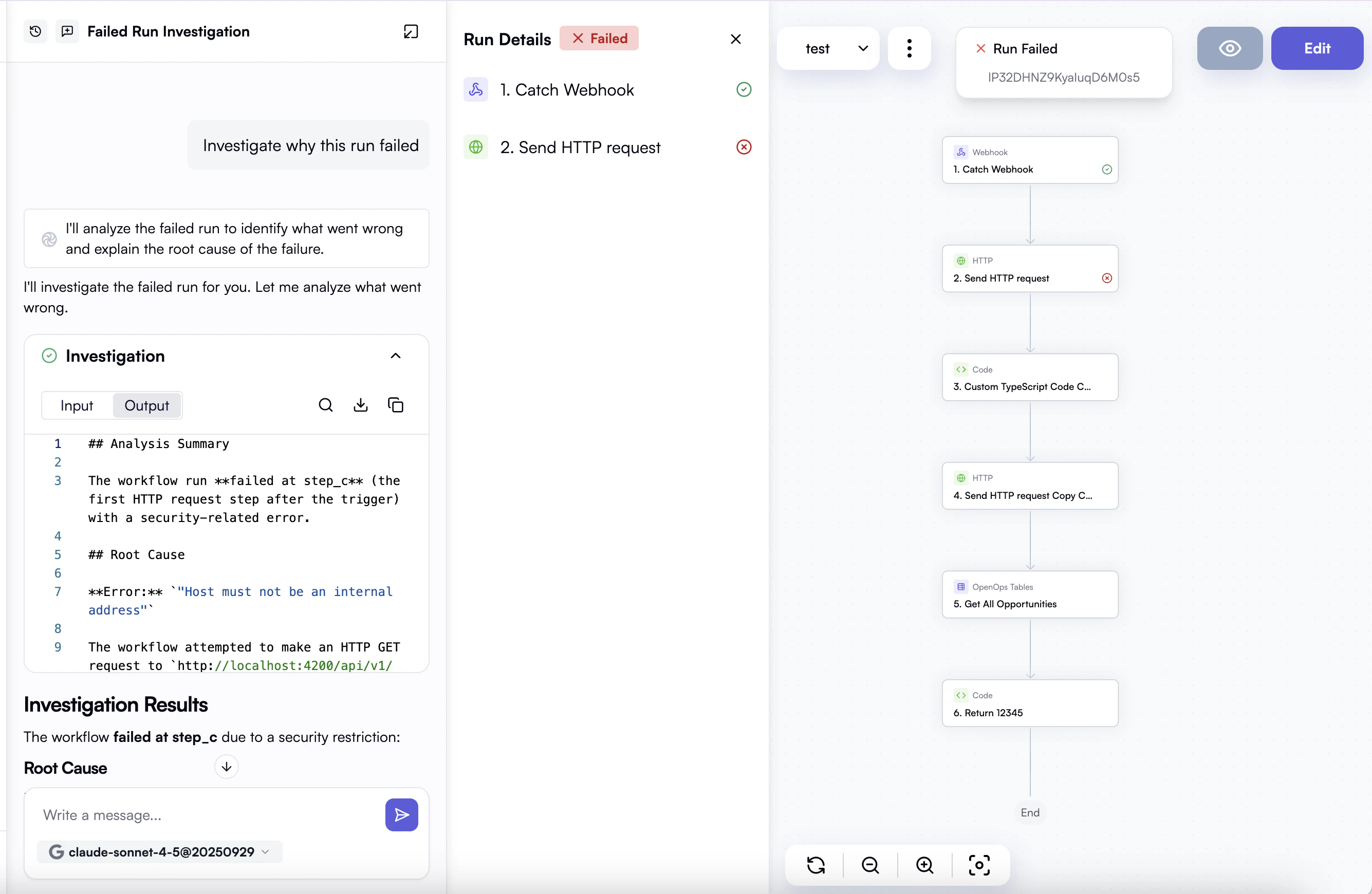 ## Investigation subagent
The first available subagent is the **Investigation** agent. It analyzes workflow execution data to help you understand why a workflow run failed, behaved unexpectedly, or performed poorly.
The investigation subagent can help you:
* **Diagnose failures** — identify which step failed, why it failed, and what the error means.
* **Trace unexpected behavior** — follow data through each step to explain why a workflow produced an unexpected result.
* **Spot performance issues** — find bottlenecks or steps that took longer than expected.
After completing its analysis, the agent streams a structured report with findings, and a root cause assessment.
## Using the investigation subagent
The investigation subagent is available as a tool inside the OpenOps AI chat interface.
To start an investigation:
1. Open the AI chat in your OpenOps environment.
2. Describe the issue you want to investigate — for example: *"Why did this workflow fail?"* or *"The last run produced unexpected output in the final step, can you check what happened?"*
3. Provide the **workflow run ID** you want to analyze.
4. The agent runs in the background and streams progress updates as it works. When complete, it returns its findings directly in the chat.
## How it works
Subagents run in isolation from the rest of your environment, with no persistent storage and no access to external systems beyond the data they are given.
## Enabling subagents for your environment
To learn more or to enable subagents for your environment, contact your OpenOps account manager.
## Investigation subagent
The first available subagent is the **Investigation** agent. It analyzes workflow execution data to help you understand why a workflow run failed, behaved unexpectedly, or performed poorly.
The investigation subagent can help you:
* **Diagnose failures** — identify which step failed, why it failed, and what the error means.
* **Trace unexpected behavior** — follow data through each step to explain why a workflow produced an unexpected result.
* **Spot performance issues** — find bottlenecks or steps that took longer than expected.
After completing its analysis, the agent streams a structured report with findings, and a root cause assessment.
## Using the investigation subagent
The investigation subagent is available as a tool inside the OpenOps AI chat interface.
To start an investigation:
1. Open the AI chat in your OpenOps environment.
2. Describe the issue you want to investigate — for example: *"Why did this workflow fail?"* or *"The last run produced unexpected output in the final step, can you check what happened?"*
3. Provide the **workflow run ID** you want to analyze.
4. The agent runs in the background and streams progress updates as it works. When complete, it returns its findings directly in the chat.
## How it works
Subagents run in isolation from the rest of your environment, with no persistent storage and no access to external systems beyond the data they are given.
## Enabling subagents for your environment
To learn more or to enable subagents for your environment, contact your OpenOps account manager.